1、IO流概述
1、什么是IO
I:Input
O:Output
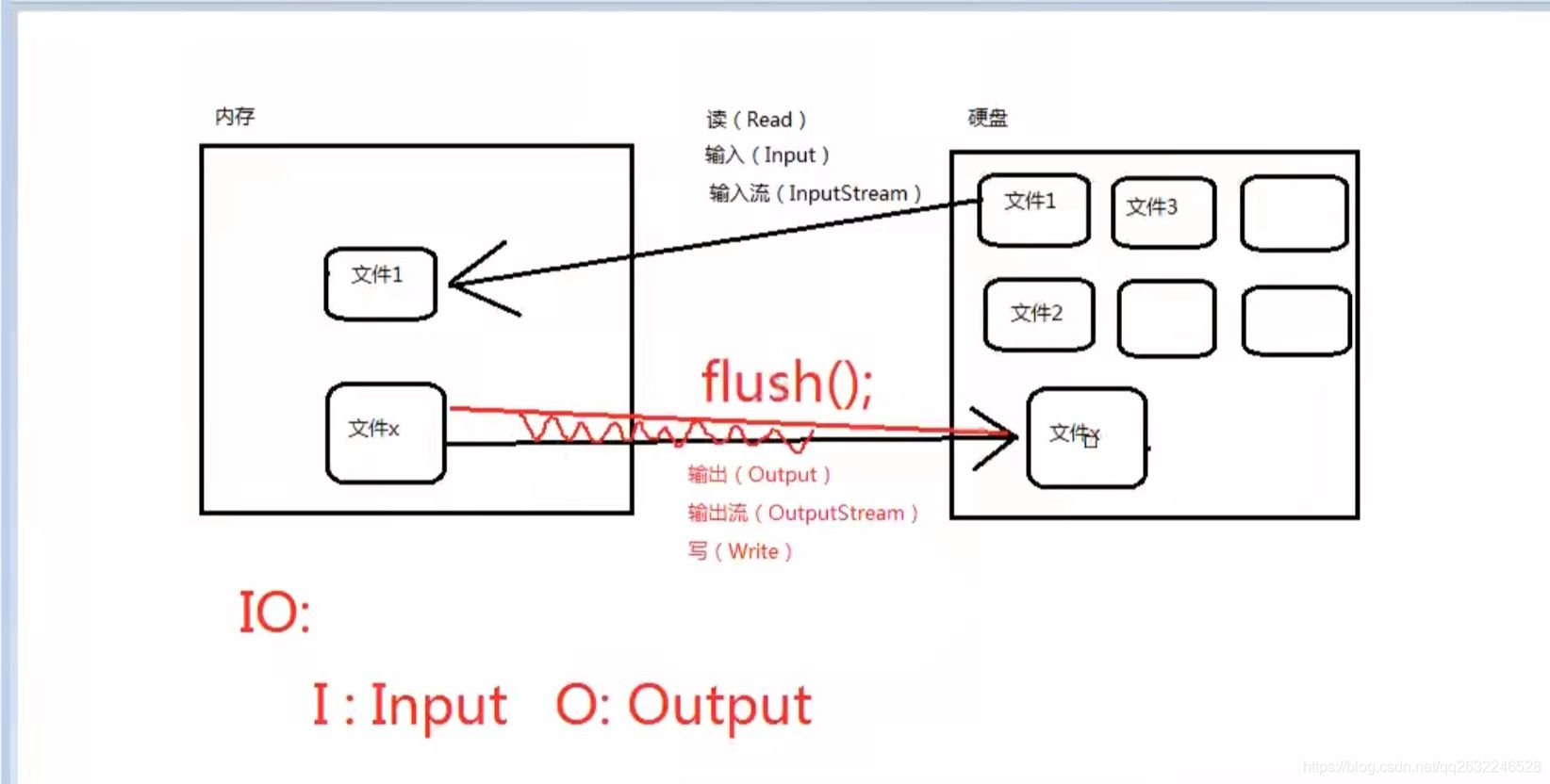
通过IO可以完成硬盘文件的读和写
Java中所有的流都在java.io.*下
2、IO流的分类
有多种分类方式:输入流、输出流、字节流、字符流
1、一种方式是按照流的方向进行分类: 以内存作为参照物。
- 往内存中去,叫做输入(Input)。或者叫做读(Read)。
- 从内存中出来,叫做输出(Output)。或者叫做写(Write)。
2、另一种方式是按照读取数据方式不同进行分类:
- 有的流是按照字节的方式读取数据,一次读取1个字节byte,等同于一次读取8个二进制位。这种流是万能的,什么类型的文件都可以读取。包括:文本文件,图片,声音文件,视频文件。。。
假设文件file.txt,采用字节流的话是这样读:
a中国bc张三fe
第一次读:一个字节,正好读到 ‘ a ’
第二次读:一个字节,正好读到 ‘ 中 ’ 字符的一半。
第三次读:一个字节,正好读到 ‘ 中 ’ 字符的另一半。
- 有的流是按照字符的方式读取数据的,一次读取一个字符,这种流是为了方便读取普通文本文件而存在的,这种流不能读取:图片、声音、视频等文件。只能读取纯文本文件,连word文件都无法读取。
假设文件file.txt,采用字符流的话是这样读:
a中国bc张三fe
第一次读: ‘ a ’字符(a字符在window系统中占用1个字节)
第二次读: ‘ 中 ’ 字符( ‘ 中 ’ 字符在window系统中占用2个字节)
3、流的四大家族
四大家族的首领:
java.io.InputStream 字节输入流
java.io.OutputStream 字节输出流
java.io.Reader 字符输入流
java.io.Writer 字符输入流
四大家族的首领都是抽象类(Abstract class)
所有的流都实现了:
java.io.Closeable接口,都是可关闭的,都有close()方法。流毕竟是一个管道,这个是内存和硬盘之间的通道,用完一定要关闭,不然会耗费大量很多资源。养成好习惯,用完流一定要关闭。
所有的输出流都实现了:
java.io.flushable接口。都是可刷新的,都有flush()方法。养成一个好习惯,输出流在最终输出之后,一定要 记得flush ()刷新一下。这个刷新表示将通道道/管道当中剩余未输出的数据强行输出完(清空管道!) 刷新的作用就是清空管道。
注意:如果没有flush()可能会导致丢失数据。|
注意:在Java中只要“类名”以Stream结尾的都是字节流。以Reader/Writer结尾的都是字符流。
4、java.io包下需要掌握的流
java.io包下需要掌握的流有16个:
文件专属:
java.io.FileInputStream(掌握)
java.io.FileOutputStream(掌握)
java.io.FileReader
java.io.FileIWriter
转换流:(将字节流转为字符流)
java.io.InputStreamReader
java.io.OutputStreamWriter
缓冲流专属:
java.io.BufferedReader
java.io.BufferedWriter
java.io.BufferedInputStream
java.io.BufferedOutputStream
数据流专属:
java.io.DataInputStream
java.io.DataOutputStream
标准输出流
java.io.PrintWriter
java.io.PrintStream(掌握)
对象专属流:
java.io.ObjectInputStream(掌握)
java.io.ObjectOutputStream(掌握)
java.io.FileInputStream:
1、文件字节流,万能的,任何类型的文件都可以采用这个流来读。
2、字节的方式,完成输入的操作,完成读的操作(硬盘–>内存)
1.1 int read() :从此输入流中读取一个数据字节
示例代码1:
1
2
3
4
5
6
7
8
9
10
11
12
13
14
15
16
17
18
19
20
21
22
23
24
25
26
27
28
29
30
31
32
33
34
35
36
37
38
39
40
41
42
43
44
45
46
47
48
49
50
51
52
53
54
55
56
| import java.io.FileInputStream;
import java.io.FileNotFoundException;
import java.io.IOException;
public class FileInputStreamtest1 {
public static void main(String[] args) {
FileInputStream fis = null;
try {
fis = new FileInputStream("C:\\Users\\Administrator\\Desktop\\temp.txt");
int readData = fis.read();
System.out.println(readData);
readData = fis.read();
System.out.println(readData);
readData = fis.read();
System.out.println(readData);
readData = fis.read();
System.out.println(readData);
readData = fis.read();
System.out.println(readData);
readData = fis.read();
System.out.println(readData);
readData = fis.read();
System.out.println(readData);
readData = fis.read();
System.out.println(readData);
} catch (FileNotFoundException e) {
e.printStackTrace();
} catch (IOException e) {
e.printStackTrace();
} finally {
if (fis != null) {
try {
fis.close();
} catch (IOException e) {
e.printStackTrace();
}
}
}
}
}
|
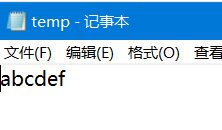
temp文件:
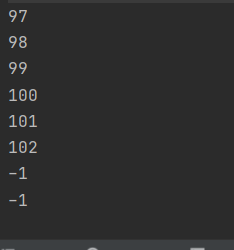
运行结果:
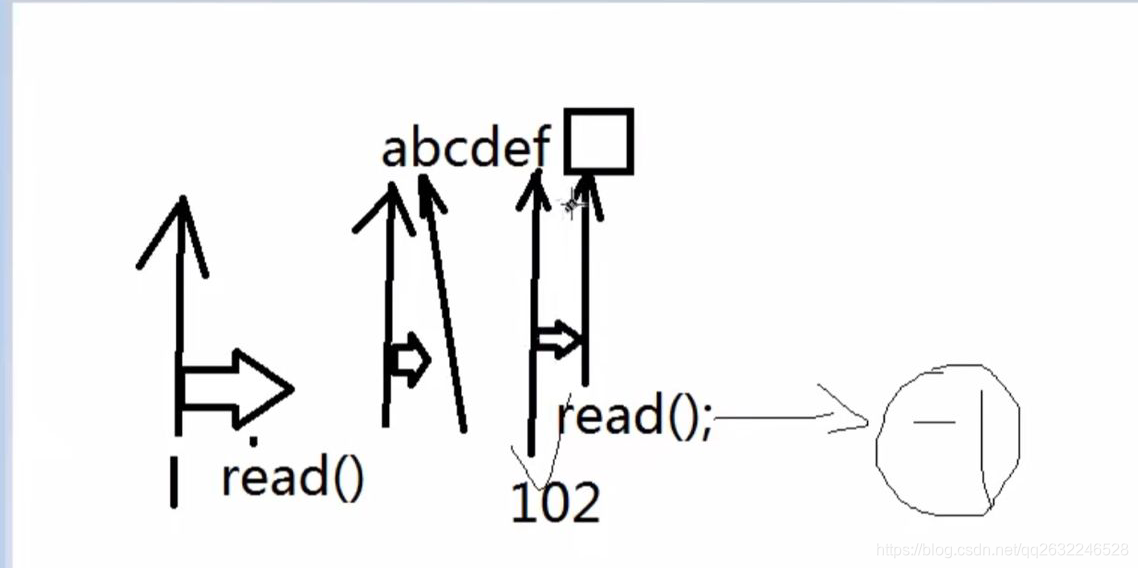
演示:
对上一个程序进行改进(使用while循环输出字节):
1
2
3
4
5
6
7
8
9
10
11
12
13
14
15
16
17
18
19
20
21
22
23
24
25
26
27
28
29
30
31
32
33
34
35
36
37
38
39
40
41
42
| import java.io.FileInputStream;
import java.io.FileNotFoundException;
import java.io.IOException;
public class FileInuputStreamtest2 {
public static void main(String[] args) {
FileInputStream fis = null;
try {
fis = new FileInputStream("C:\\Users\\Administrator\\Desktop\\temp.txt");
while (true){
int readData = fis.read();
if (readData == -1){
break;
}
System.out.println(readData);
}
int readData = 0 ;
while ((readData =fis.read())!= -1){
System.out.println(readData);
}
} catch (FileNotFoundException e) {
e.printStackTrace();
} catch (IOException e) {
e.printStackTrace();
} finally {
if (fis != null) {
try {
fis.close();
} catch (IOException e) {
e.printStackTrace();
}
}
}
}
}
|
运行结果:
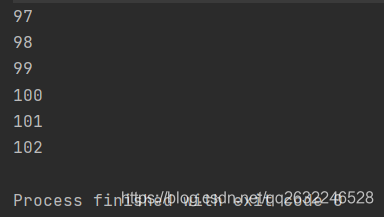
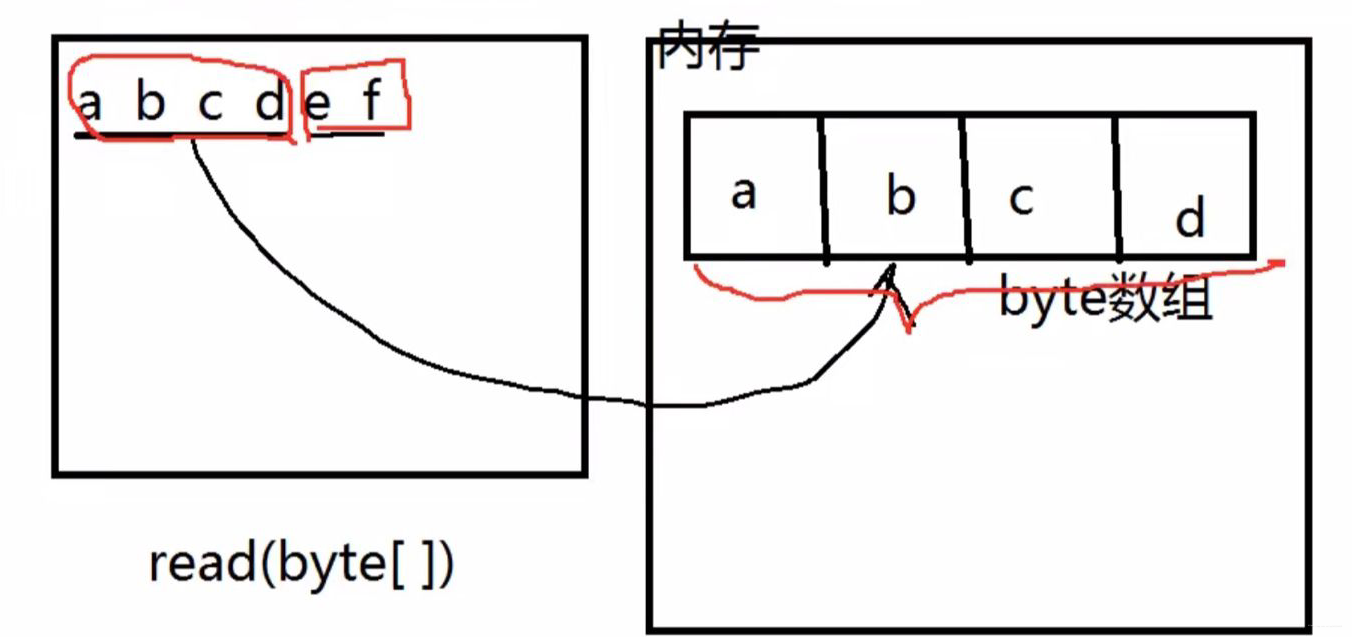
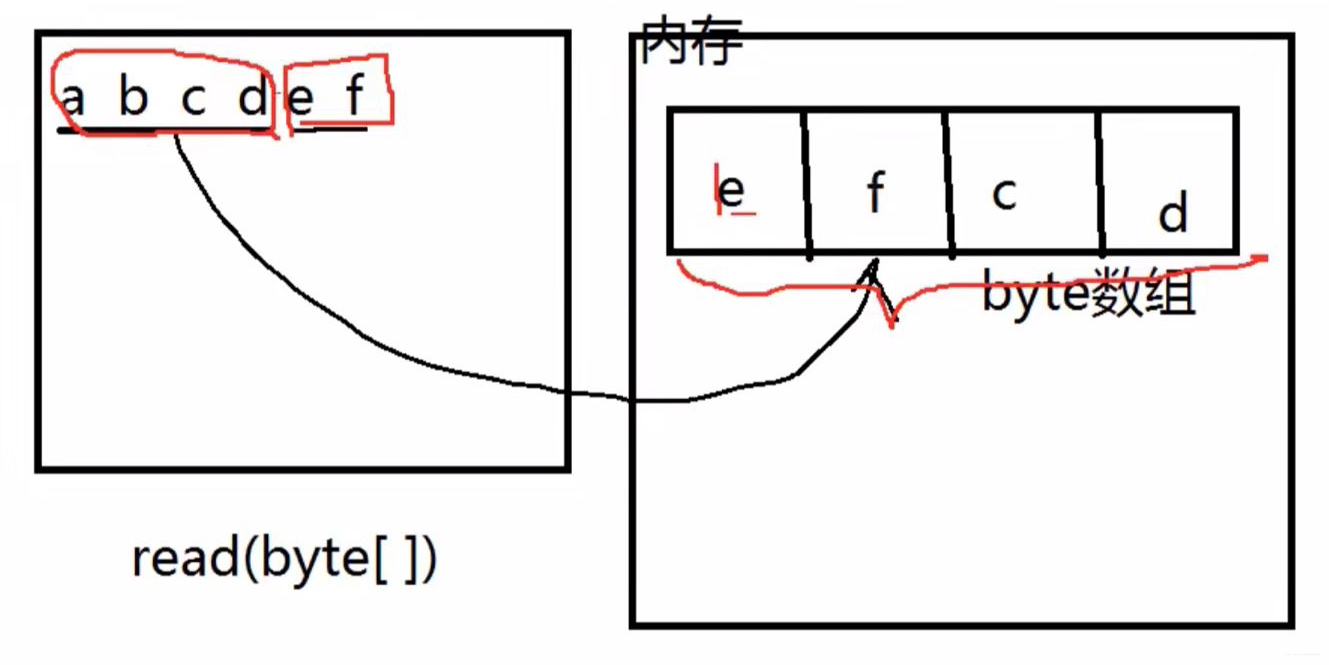
1.2 int read(byte[] b)一次最多读取b.length个字节
减少硬盘和内存的交互,提高程序的执行效率。
往byte[] 数组当中读
1
2
3
4
5
6
7
8
9
10
11
12
13
14
15
16
17
18
19
20
21
22
23
24
25
26
27
28
29
30
31
32
33
34
35
36
37
38
39
40
41
| import java.io.FileInputStream;
import java.io.IOException;
public class FileInputStreamtest3 {
public static void main(String[] args) {
FileInputStream fis = null;
try {
fis = new FileInputStream("temp");
byte[] bytes = new byte[4];
int readCount = fis.read(bytes);
System.out.println(readCount);
System.out.println(new String(bytes));
System.out.println(new String(bytes,0,readCount));
readCount = fis.read(bytes);
System.out.println(readCount);
System.out.println(new String(bytes));
System.out.println(new String(bytes,0,readCount));
readCount = fis.read(bytes);
System.out.println(readCount);
System.out.println(new String(bytes));
}catch (IOException e){
e.printStackTrace();
}finally {
try {
fis.close();
} catch (IOException e) {
e.printStackTrace();
}
}
}
}
|
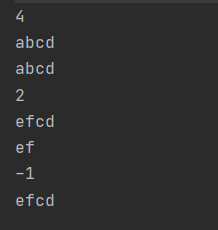
运行结果:
改进后(while循环):
1
2
3
4
5
6
7
8
9
10
11
12
13
14
15
16
17
18
19
20
21
22
23
24
25
26
27
28
29
30
31
32
33
34
35
36
37
38
| import java.io.FileInputStream;
import java.io.IOException;
public class FileIuputStreamtest4 {
public static void main(String[] args) {
FileInputStream fis = null;
try {
fis = new FileInputStream("temp");
byte[] bytes = new byte[4];
while(true){
int readCount = fis.read(bytes);
if (readCount == -1){
break;
}
System.out.print(new String(bytes,0, readCount));
}
或
}catch (IOException e){
e.printStackTrace();
}finally {
if (fis != null){
try {
fis.close();
} catch (IOException e) {
e.printStackTrace();
}
}
}
}
}
|
运行结果:

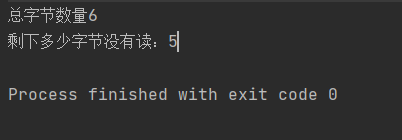
1.3int available() :返回流当中剩余的没有读到的字节数量
在上述代码的前提下进行修改:
1
2
3
4
5
6
| fis = new FileInputStream("temp");
System.out.println("总字节数量" + fis.available());
int readByte = fis.read();
System.out.println("剩下多少字节没有读:" + fis.available());
|
运行结果:
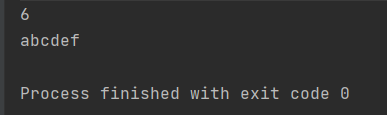
也可采用以下方法输出文件(不适合太大的文件,因为byte[]数组不能太大大)
1
2
3
| byte[] bytes = new byte[fis.available()];
System.out.println(fis.read(bytes));
System.out.println(new String(bytes));
|
运行结果:
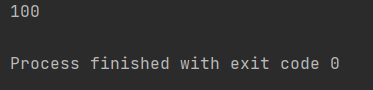
1.4 long skip(long n ):跳过几个字节不读
修改以上代码:
1
2
| fis.skip(3);
System.out.println(fis.read());
|
运行结果:
2、FileOutputStream
文件字节输出流,负责写。
从内存到硬盘。
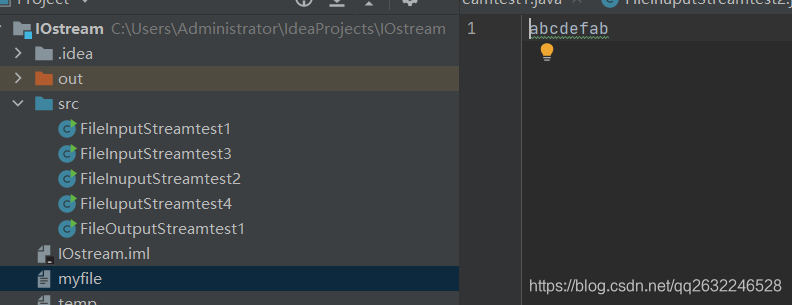
2.1 输入字节到文件
这种方式将字节输出到文件中(但是谨慎使用,这种方式会将原文件清空,然后重新写入):
1
2
3
4
5
6
7
8
9
10
11
12
13
14
15
16
17
18
19
20
21
22
23
24
25
26
27
28
29
30
31
32
33
34
| import java.io.FileNotFoundException;
import java.io.FileOutputStream;
import java.io.IOException;
public class FileOutputStreamtest1 {
public static void main(String[] args) {
FileOutputStream fos = null;
try {
fos = new FileOutputStream("myfile");
byte[] bytes = {97,98,99,100,101,102};
fos.write(bytes);
fos.write(bytes,0,2);
fos.flush();
}catch (FileNotFoundException e) {
e.printStackTrace();
} catch(IOException e){
e.printStackTrace();
}finally {
if (fos != null){
try {
fos.close();
} catch (IOException e) {
e.printStackTrace();
}
}
}
}
}
|
运行结果:
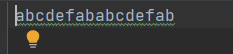
以追加的方式在文件末尾写入。不会清空原文件内容:
只需在后面加true,即可拼接
1
| fos = new FileOutputStream("myfile",true);
|
运行结果:
2.2 输入字符串到文件
1
2
3
| String s = "我是任义";
byte[] bs = s.getBytes();
fos.write(bs);
|
输出结果:

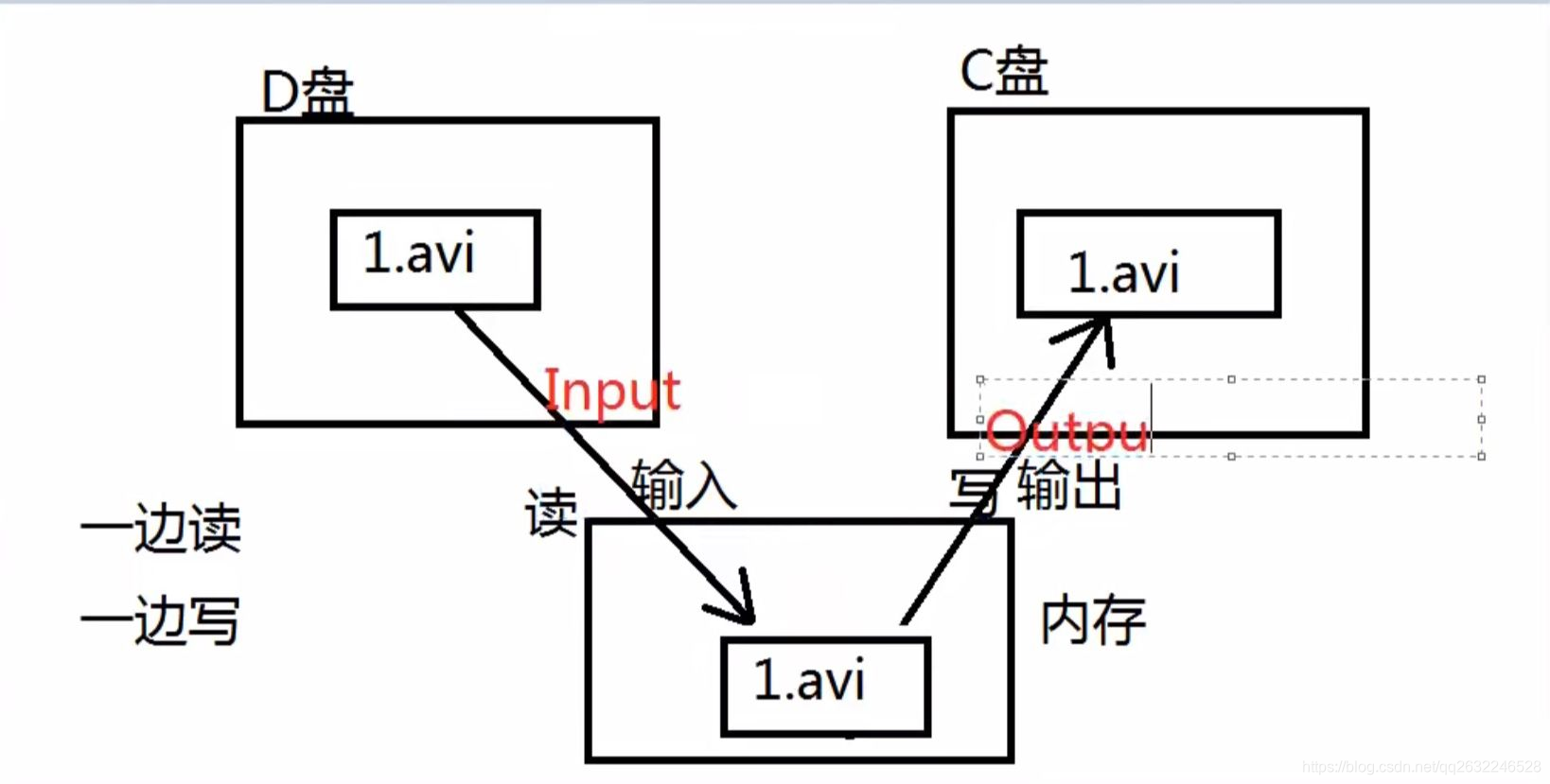
拷贝的过程是一边读一边写。
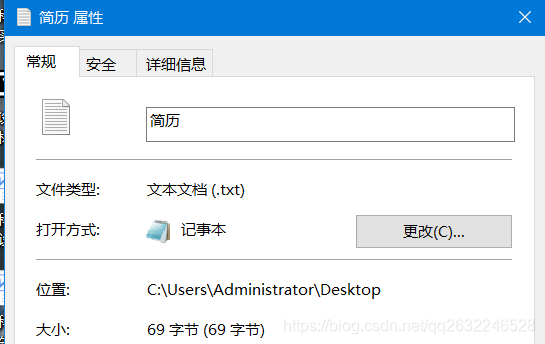
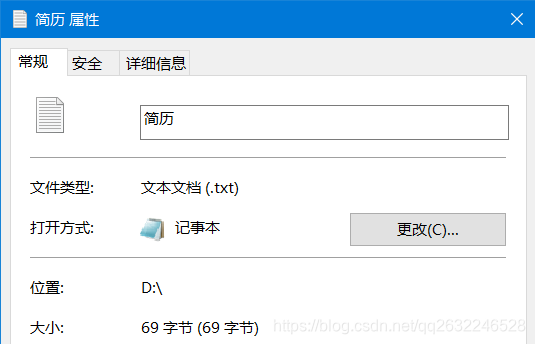
使用以上的字节流拷贝文件的时候,文件类型随意,万能的。什么样的文件都能拷贝
1
2
3
4
5
6
7
8
9
10
11
12
13
14
15
16
17
18
19
20
21
22
23
24
25
26
27
28
29
30
31
32
33
34
35
36
37
38
39
40
41
42
43
| import java.io.FileInputStream;
import java.io.FileNotFoundException;
import java.io.FileOutputStream;
import java.io.IOException;
public class Copy01 {
public static void main(String[] args) {
FileInputStream fis = null;
FileOutputStream fos = null;
try {
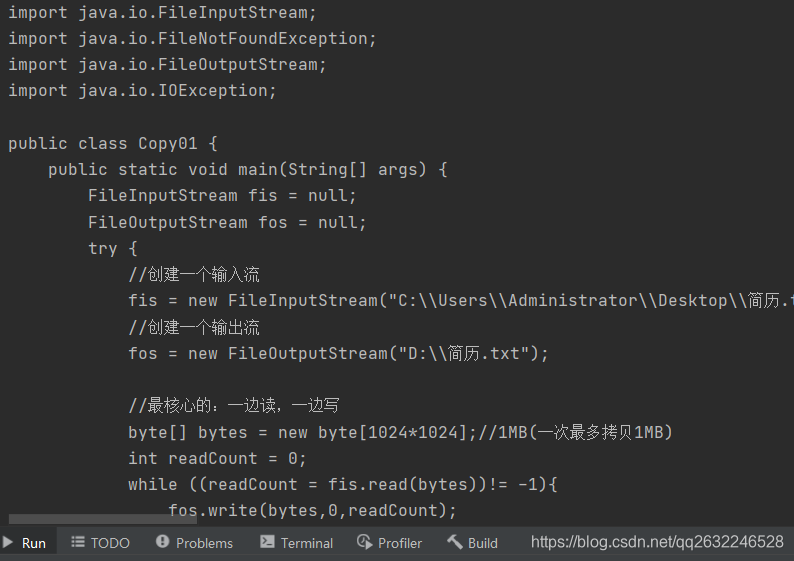
fis = new FileInputStream("C:\\Users\\Administrator\\Desktop\\简历.txt");
fos = new FileOutputStream("D:\\简历.txt");
byte[] bytes = new byte[1024*1024];
int readCount = 0;
while ((readCount = fis.read(bytes))!= -1){
fos.write(bytes,0,readCount);
}
} catch (FileNotFoundException e) {
e.printStackTrace();
}catch (IOException e){
e.printStackTrace();
}finally {
if (fis != null){
try {
fis.close();
} catch (IOException e) {
e.printStackTrace();
}
if (fos !=null){
try {
fos.close();
} catch (IOException e) {
e.printStackTrace();
}
}
}
}
}
}
|
3、FileReader和FileWriter
1、FileReader
文件字符输入流,只能读取普通的文本,
读取普通文本内容时,比较方便,快捷。
1
2
3
4
5
6
7
8
9
10
11
12
13
14
15
16
17
18
19
20
21
22
23
24
25
26
27
28
29
30
31
| import java.io.FileNotFoundException;
import java.io.FileReader;
import java.io.IOException;
public class FileReadertest1 {
public static void main(String[] args) {
FileReader reader = null;
try {
reader = new FileReader("temp");
char[] chars= new char[4];
int readCount = 0;
while ((readCount = reader.read(chars)) != -1){
System.out.print(new String(chars,0,readCount));
}
} catch (FileNotFoundException e) {
e.printStackTrace();
}catch (IOException e){
e.printStackTrace();
}finally {
try {
reader.close();
} catch (IOException e) {
e.printStackTrace();
}
}
}
}
|
运行结果:

2、FileWriter
文件字符输出流。写
只能输出普通文本
write的三种构造方法:
1
2
3
4
5
6
7
8
9
10
11
12
13
14
15
16
17
18
19
20
21
22
23
24
25
26
27
28
29
30
31
| import java.io.FileWriter;
import java.io.IOException;
public class FileWritertest {
public static void main(String[] args) {
FileWriter out = null;
try {
out = new FileWriter("file");
char[] chars = {'我','是','中','国','人'};
out.write(chars);
out.write(chars,2,3);
out.write("我是一名Java软件攻城狮");
out.write("\n");
out.write("hello world!");
out.flush();
} catch (IOException e) {
e.printStackTrace();
}finally {
try {
out.close();
} catch (IOException e) {
e.printStackTrace();
}
}
}
}
|
运行结果:

3、复制普通文本文件
1
2
3
4
5
6
7
8
9
10
11
12
13
14
15
16
17
18
19
20
21
22
23
24
25
26
27
28
29
30
31
32
33
34
35
36
37
38
39
40
41
42
43
44
45
| import java.io.FileNotFoundException;
import java.io.FileReader;
import java.io.FileWriter;
import java.io.IOException;
public class CopyTest2 {
public static void main(String[] args) {
FileReader in =null;
FileWriter out = null;
try {
in = new FileReader("C:\\Users\\Administrator\\Desktop\\简历.txt");
out = new FileWriter("D:\\copy简历.txt");
char[] chars = new char[1024*512];
int readCount = 0;
while ((readCount = in.read(chars)) != -1){
out.write(chars,0,readCount);
}
out.flush();
} catch (FileNotFoundException e) {
e.printStackTrace();
} catch (IOException e) {
e.printStackTrace();
}finally {
if (in != null) {
try {
in.close();
} catch (IOException e) {
e.printStackTrace();
}
if (out != null){
try {
out.close();
} catch (IOException e) {
e.printStackTrace();
}
}
}
}
}
}
|
4、缓冲流、转换流、节点流、包装流
1、BufferedRead(带有缓冲的字符输入流)
- 带有缓冲区的字符输入流
- 使用这些流的时候不需要自定义char数组,或者说不需要自定义byte数组,自带缓冲。
1、节点流和包装流
- 当一个流的构造方法中需要一个流的时候,这个被传进来的流叫做:节点流。
- 外部负责包装的这个流,叫做:包装流,还有一个名字叫做:处理流。
2、readline :读一行字符
1
2
3
4
5
6
7
8
9
10
11
12
13
14
15
16
17
18
19
20
21
22
23
24
25
26
27
28
29
30
31
| import java.io.BufferedReader;
import java.io.FileReader;
import java.io.IOException;
public class BufferedReadertest1 {
public static void main(String[] args) throws IOException {
FileReader reader = new FileReader("src/Copy01.java");
BufferedReader br = new BufferedReader(reader);
String firstLine = br.readLine();
System.out.println(firstLine);
String secondLine = br.readLine();
System.out.println(secondLine);
String thirdLine = br.readLine();
System.out.println(thirdLine);
String s = null;
while((s = br.readLine()) != null){
System.out.println(s);
}
br.close();
}
}
|
这里只演示InputStreamWriter的转换流:OutputStreamWriter在BufferedWrite中演示
1
2
3
4
5
6
7
8
9
10
11
12
13
14
15
16
17
18
19
20
21
22
23
24
25
26
27
28
29
30
| import java.io.BufferedReader;
import java.io.FileInputStream;
import java.io.FileNotFoundException;
import java.io.InputStreamReader;
public class BufferedReaderTest2 {
public static void main(String[] args) throws Exception {
BufferedReader br = new BufferedReader(new InputStreamReader(new FileInputStream("src/Copy01.java")));
String line = null;
while ((line = br.readLine()) != null){
System.out.println(line);
}
br.close();
}
}
|
3、BufferedWrite:(带有缓冲的字符输出流)
1
2
3
4
5
6
7
8
9
10
11
12
13
14
15
16
| import java.io.BufferedWriter;
import java.io.FileOutputStream;
import java.io.IOException;
import java.io.OutputStreamWriter;
public class BufferedWriteTest {
public static void main(String[] args) throws IOException {
BufferedWriter out = new BufferedWriter(new OutputStreamWriter(new FileOutputStream("temp")));
out.write("hello world");
out.write("\n");
out.write("hello kitty");
out.flush();
out.close();
}
}
|
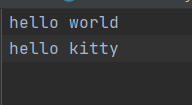
5、数据流、标准输出流、日志工具
1、数据流
1、DataOutputStream(数据字节输出流)
java.io.DataOutputStream数据专属的流
这个流可以将数据连同数据的类型一同写入文件。
注意:这个文件不是普通文本文档。(这个文档用记事本打不开)
1
2
3
4
5
6
7
8
9
10
11
12
13
14
15
16
17
18
19
20
21
22
23
24
25
26
27
28
29
30
31
32
33
34
35
36
| import java.io.DataOutputStream;
import java.io.FileOutputStream;
import java.io.IOException;
public class DataOutputStreamTest {
public static void main(String[] args) throws IOException {
DataOutputStream dos = new DataOutputStream(new FileOutputStream("data"));
byte b = 100;
short s = 200;
int i = 300;
long l = 400L;
float f = 3.0F;
double d =3.14;
boolean sex = false;
char c = 'a';
dos.writeByte(b);
dos.writeShort(s);
dos.writeInt(i);
dos.writeLong(l);
dos.writeFloat(f);
dos.writeDouble(d);
dos.writeBoolean(sex);
dos.writeChar(c);
dos.flush();
dos.close();
}
}
|
2、DataIuputStream(数据字节输入流)
DataOutputStream写的文件,只能使用DataIuputStream去读。并且读的时候你需要提前知道写入的顺序。
读的顺序需要和写的顺序一致,才可以正常取出数据。
1
2
3
4
5
6
7
8
9
10
11
12
13
14
15
16
17
18
19
20
21
22
23
24
25
26
27
| import java.io.FileInputStream;
import java.io.DataInputStream;
public class DataInputStreamTest {
public static void main(String[] args) throws Exception{
DataInputStream dis = new DataInputStream(new FileInputStream("data"));
byte b = dis.readByte();
short s = dis.readShort();
int i = dis.readInt();
long l = dis.readLong();
float f = dis.readFloat();
double d =dis.readDouble();
boolean sex = dis.readBoolean();
char c = dis.readChar();
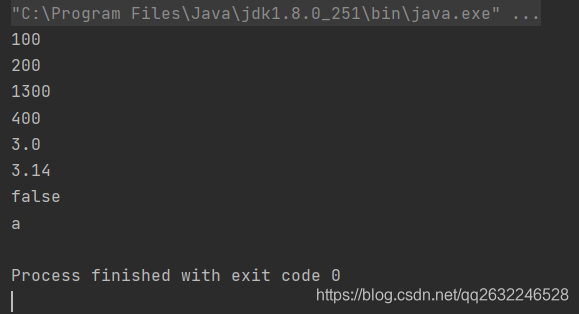
System.out.println(b);
System.out.println(s);
System.out.println(i + 1000);
System.out.println(l);
System.out.println(f);
System.out.println(d);
System.out.println(sex);
System.out.println(c);
}
}
|
运行结果:
标准输出流不需要手动close()关闭
1
2
3
4
5
6
7
8
9
10
11
12
13
14
15
16
17
18
19
20
21
22
23
24
25
26
27
| import java.io.FileOutputStream;
import java.io.PrintStream;
public class PrintStreamTest1 {
public static void main(String[] args) throws Exception {
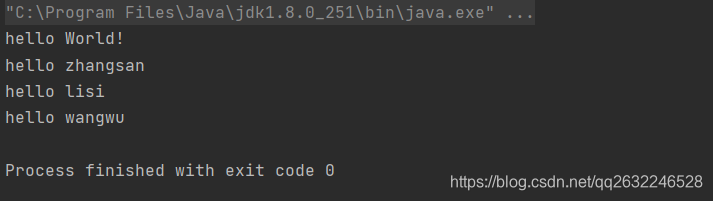
System.out.println("hello World!");
PrintStream ps = System.out;
ps.println("hello zhangsan");
ps.println("hello lisi");
ps.println("hello wangwu");
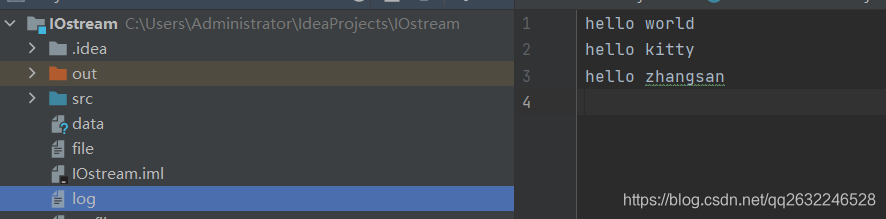
PrintStream printStream = new PrintStream(new FileOutputStream("log"));
System.setOut(printStream);
System.out.println("hello world");
System.out.println("hello kitty");
System.out.println("hello zhangsan");
}
}
|
3、日志工具
日志工具logger类:
1
2
3
4
5
6
7
8
9
10
11
12
13
14
15
16
17
18
19
20
21
22
23
24
25
26
27
| import java.io.FileNotFoundException;
import java.io.FileOutputStream;
import java.io.PrintStream;
import java.text.SimpleDateFormat;
import java.util.Date;
public class logger {
public static void log(String msg){
try {
PrintStream out = new PrintStream(new FileOutputStream("log.txt",true));
System.setOut(out);
Date nowTime = new Date();
SimpleDateFormat sdf = new SimpleDateFormat("yyyy-MM-dd HH:mm:ss:sss");
String strTime = sdf.format(nowTime);
System.out.println(strTime + ":" + msg);
} catch (FileNotFoundException e) {
e.printStackTrace();
}
}
}
|
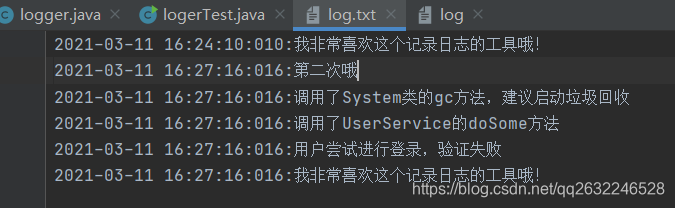
运行测试:
第一次运行
1
2
3
4
5
6
7
| public class logerTest {
public static void main(String[] args) {
logger.log("我非常喜欢这个记录日志的工具哦!");
}
}
|
第二次运行
1
2
3
4
5
6
7
8
9
10
11
| public class logerTest {
public static void main(String[] args) {
logger.log("第二次哦");
logger.log("调用了System类的gc方法,建议启动垃圾回收");
logger.log("调用了UserService的doSome方法");
logger.log("用户尝试进行登录,验证失败");
logger.log("我非常喜欢这个记录日志的工具哦!");
}
}
|
6、对象专属流、序列化和反序列化、Serializable接口、transient关键字
1、序列化和反序列化的理解
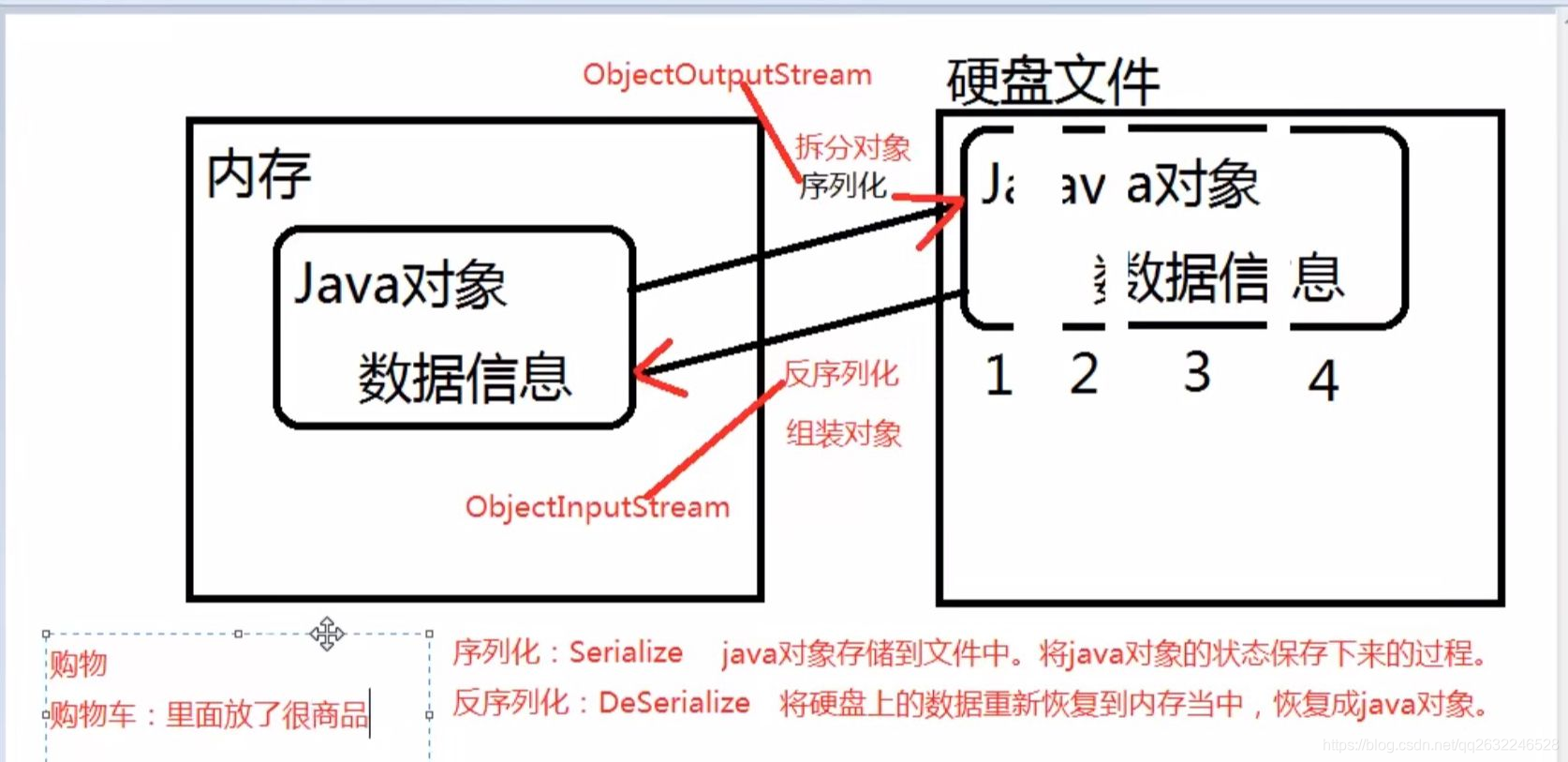
什么是序列化?
序列化是将对象状态转换为可保持或传输的格式的过程。与序列化相对的是反序列化,它将流转换为对象。这两个过程结合起来,可以轻松地存储和传输数据
2、通过对象专属流实现序列化
一个对象序列化的接口,一个类只有实现了Serializable接口,它的对象才能被序列化。
参与序列化和反序列化的对象,必须实现Serializable接口
注意:
通过源码发现,Serializeable接口只是一个标志接口:
1
2
| public interface Serializable{
}
|
这个接口什么代码都没有,那么他有什么作用呢?
起到标识的作用,标志的作用,java虚拟机看到这个类实现了这个接口,会对这个类进行特殊待遇,JVM看到Serializeable接口后,会为该类自动生成一个序列化版本号。
1
2
3
4
5
6
7
8
9
10
11
12
13
14
15
16
17
18
| import java.io.FileOutputStream;
import java.io.ObjectOutputStream;
import java.io.Serializable;
public class ObjectOutputStreamTest {
public static void main(String[] args) throws Exception {
Student s = new Student(1111,"zhangsan");
ObjectOutputStream oos = new ObjectOutputStream(new FileOutputStream("students"));
oos.writeObject(s);
oos.flush();
oos.close();
}
}
|
3、序列化版本号
Java虚拟机会默认提供序列版本号。如果类的源代码改动之后,需要重新编译,编译之后生成了全新的字节码文件。并且class文件再次运行的时候,java虚拟机生成的序列化版本号也会发生相应的改变。
建议将序列版本号手动写出来,不建议自动生成。
1
2
3
4
5
6
| class Student implements Serializable {
private static final long serialVersionUID = 1L;
private int no;
private String name;
|
1、java语言是采用什么样的机制来区分分类的?
- 第一:首先通过类名进行比对,如果类名不一样,肯定不是同一个类
- 第二:如果类名一样,靠序列化版本号进行区分。
小鹏编写了一个类: com . bjipowernode . java. bean. Student implements Serial izable
胡浪编写了一个类: com . bjpowernode. java. bean. Student implements Serial izable
不同的人编写了同一个类,但“这两个类确实不是同一个类”。这个时候序列化版本就起上作用了。
对于java虚拟机来说, java虚拟机是可以区分开这两个类的,因为这两个类都实现了Serializable接口,都有默认的序列化版本号,他们的序列化版本号不一样。所以区分开了。( 这是自动生成序列化版本号的好处)
这种自动生成序列化版本号有什么缺陷?
这种自动生成的序列化版本号缺点是:一旦代码确定之后,不能进行后续的修改,因为只要修改,必然会重新编译,此时会生成全新的序列化版本号,这个时候java虚拟机会认为这是一个全新的类。( 这样就不好了! )
结论:
凡是一个类实现了Serializable接口,建议给该类提供一个固定不变的序列化版本号。
这样,即使以后这个类代码修改了,但是版本号不变,java虚拟机会认为是同一个类
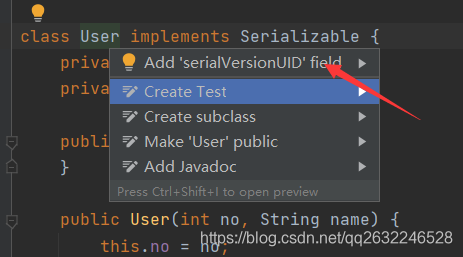
2、IDEA生成序列化版本号
File -> Settings -> Editor -> Inspections -> 搜索serializable -> 选中Serializable classes Without a serialVersionUID -> Apply
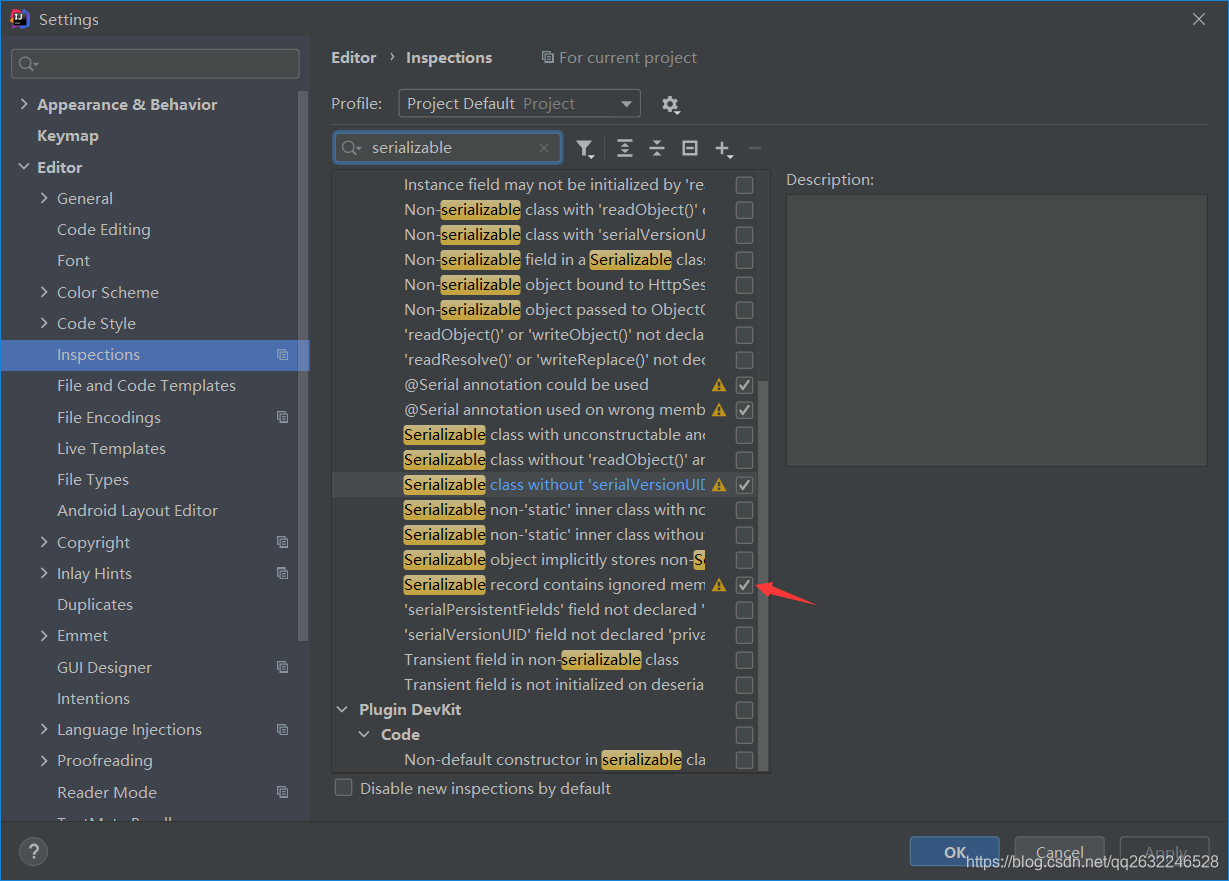
然后再类名上:Alt+回车
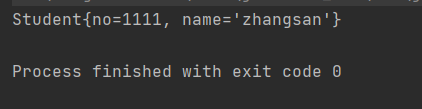
4、通过对象专属流实现反序列化
1
2
3
4
5
6
7
8
9
10
11
12
13
14
15
16
17
18
19
20
21
22
23
24
25
26
27
28
29
30
31
32
33
34
| import java.io.Serializable;
class Student implements Serializable {
private int no;
private String name;
public Student(int no, String name) {
this.no = no;
this.name = name;
}
@Override
public String toString() {
return "Student{" +
"no=" + no +
", name='" + name + '\'' +
'}';
}
}
import java.io.FileInputStream;
import java.io.ObjectInputStream;
public class ObjectInputStreamTest {
public static void main(String[] args) throws Exception{
ObjectInputStream ois = new ObjectInputStream(new FileInputStream("students"));
Object obj = ois.readObject();
System.out.println(obj);
ois.close();
}
}
|
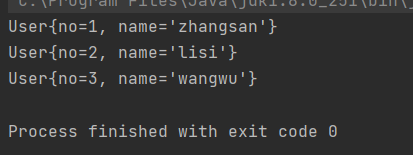
5、序列化多个对象
把对象放入集合中去,序列化集合。
1
2
3
4
5
6
7
8
9
10
11
12
13
14
15
16
17
18
19
20
21
22
23
24
25
26
27
28
29
30
31
32
33
34
35
36
37
38
39
40
41
42
43
44
45
46
47
48
49
50
51
52
53
54
55
56
57
58
59
60
61
62
63
64
65
66
67
68
69
70
71
72
73
74
| class User implements Serializable {
private int no;
private String name;
public User() {
}
public User(int no, String name) {
this.no = no;
this.name = name;
}
@Override
public String toString() {
return "User{" +
"no=" + no +
", name='" + name + '\'' +
'}';
}
public int getNo() {
return no;
}
public void setNo(int no) {
this.no = no;
}
public String getName() {
return name;
}
public void setName(String name) {
this.name = name;
}
}
import java.io.FileOutputStream;
import java.io.IOException;
import java.io.ObjectOutputStream;
import java.util.ArrayList;
import java.util.List;
public class ObjectOutputStreamTest2 {
public static void main(String[] args) throws IOException {
List<User> userList = new ArrayList<>();
userList.add(new User(1,"zhangsan"));
userList.add(new User(2,"lisi"));
userList.add(new User(3,"wangwu"));
ObjectOutputStream oos = new ObjectOutputStream(new FileOutputStream("users"));
oos.writeObject(userList);
oos.flush();
oos.close();
}
}
import java.io.FileInputStream;
import java.io.ObjectInputStream;
import java.util.List;
public class ObjectInputStreamTest2 {
public static void main(String[] args) throws Exception{
ObjectInputStream ois = new ObjectInputStream(new FileInputStream("users"));
List<User> userList = (List<User>)ois.readObject();
for(User users: userList){
System.out.println(users);
}
ois.close();
}
}
|
运行结果:
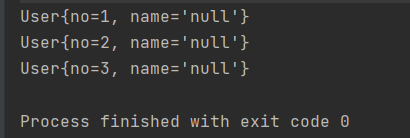
6、transient关键字
transient关键字表示游离的,不参与序列化
User类加入transient关键字修改:
1
| private transient String name;
|
再次运行结果:
7、File类
File类和IO流四大家族没有关系,所以File类不能完成文件的读和写。
位于java.io.File 下
File对象代表什么?
一个File对象有可能对应的是目录,也可能是文件
- C:\Drivers 是一个File对象
- C:\Drivers\Lan\Readme\Readme.txt 也是一个File对象
File只是一个路径名的抽象表达式。
File类的常用方法
创建一个File对象
1
2
| File f = new File("D:\\file")
1
|
boolean exits() 判断文件是否存在
boolean creatNewFile() 以文件的形式创建出来
boolean mkdir() 以目录的形式新建
boolean mkdirs() 多重目录的形式新建
String getParent() 获取文件的父路径
File getParentFile() 获取文件的父文件
File getAbsoluteFile():返回抽象路径文件。
String getAbsoulutePath() 获取文件的绝对路径
boolean isAbsolute():测试此抽象路径名是否为绝对路径。
boolean isDirectory():测试此抽象路径名表示的文件是否为目录。
boolean isFile() :测试此抽象路径名表示的文件是否为普通文件。
long lastModified(): 返回上次修改此抽象路径名表示的文件的时间。(从1970年到现在的毫秒)
File[] listFiles():返回一个抽象路径名数组,表示此抽象路径名表示的目录中的文件。(即获取当前目录下的所有子文件)
8、IO流+Properties集合的联合使用
IO流:文件的读和写
Properties:是一个Map集合,key和value都是String类型
设计理念:
以后经常改变的数据,可以单独写到一个文件中,使用程序动态读取。将来只需要修改这个文件的内容,java代码不需要改动,不需要重新编译,服务器也不需要重启。就可以拿到动态的信息。
类似于以上机制的这种文件被称为配置文件
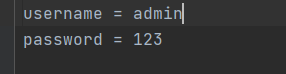
并且当配置文件中的内容格式是:
1
2
3
| key1 = value
key2 = value
12
|
的时候,我们把这种配置文件叫做属性配置文件。
1
2
3
4
5
6
7
8
9
10
11
12
13
14
15
16
17
18
19
20
21
22
| import java.io.FileReader;
import java.util.Properties;
public class IoPropertiesTest01 {
public static void main(String[] args) throws Exception{
FileReader reader = new FileReader("src\\userinfo");
Properties pro = new Properties();
pro.load(reader);
String username = pro.getProperty("username");
System.out.println(username);
String password = pro.getProperty("password");
System.out.println(password);
}
}
|

java规范中有要求:属性配置文件建议以.properties结尾,但这不是必须的。
这种以properties结尾的文件在java中被称为:属性配置文件。
其中properties是专门存放属性配置文件内容的一个类。
2、属性配置文件
- 属性配置文件中最好不要有空格。
- 属性配置文件中的key重复的话,value会自动覆盖!
- #是注释
- 建议key和value之间使用=的方式